Launch offer — valid today only

📄 Digital book in PDF · read it on your phone or print it

Networking & Cabling Illustrated: Pinouts, Subnets and Troubleshooting in Drawings From the Wall Jack to the IP Address, Always in the Same Order

RJ45 pinouts wire by wire, copper vs. fiber, PoE, the OSI model, subnetting, DHCP and DNS, VLANs, Wi-Fi and troubleshooting. Every topic gets its own page: the drawing first, then what you need to remember. 75 illustrated pages.

START STUDYING THIS WAY

🔒 Secure checkout · PDF by email · 30-day guarantee

Every topic, its own pageEvery pinout, layer and step drawn, with the explanation right beside it
75 illustrated pages9 parts, from the network map to the job checklists
Up-to-date sourcesANSI/TIA-568, IEEE 802.3 and 802.11, and the NEC
PDF by emailFormat

Look Inside the Book

Every page has one big drawing and a box with the numbers, colors and steps you need to know:

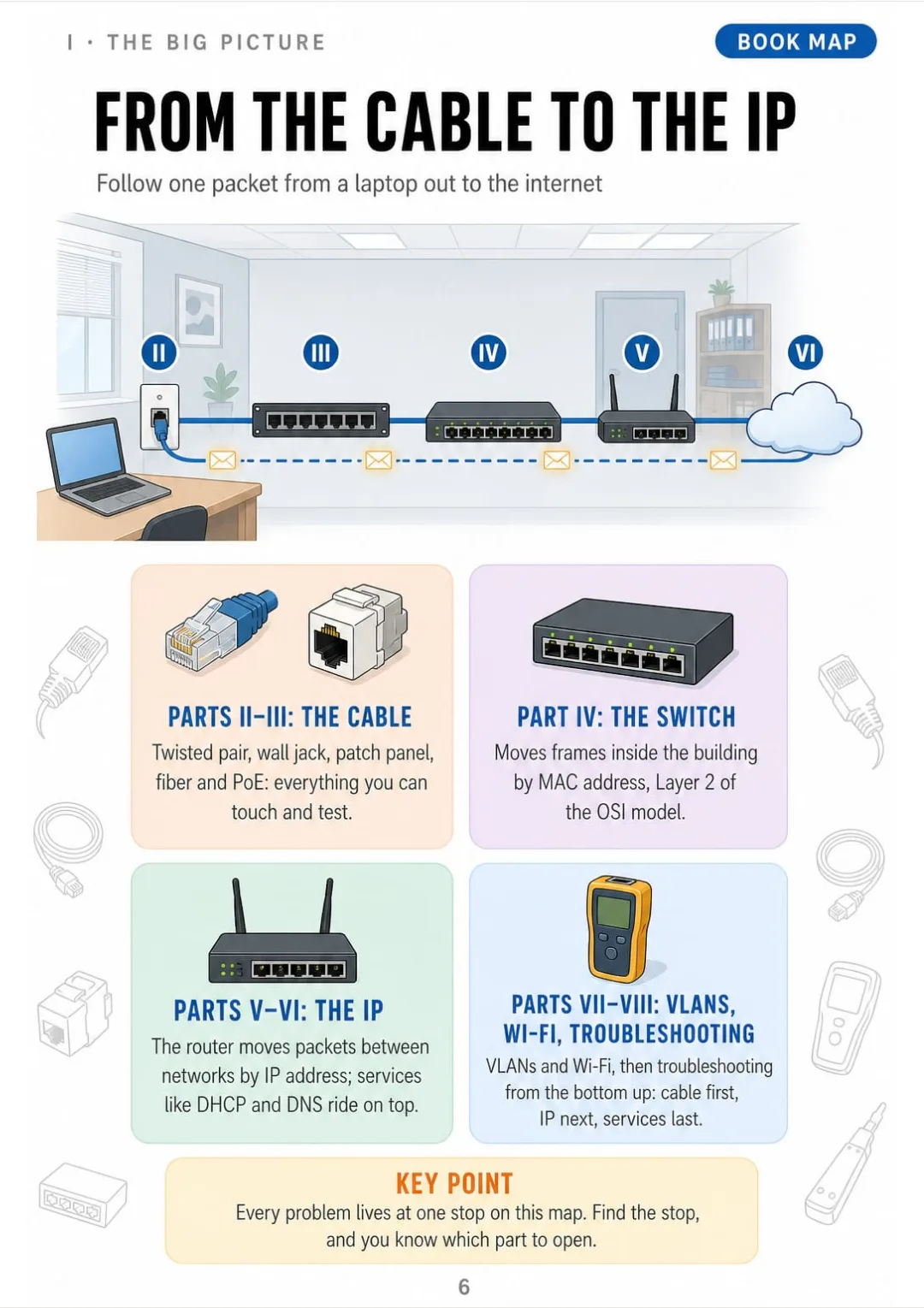
Wall jack → patch panel → switch → router → ISP, each stop tied to its book part
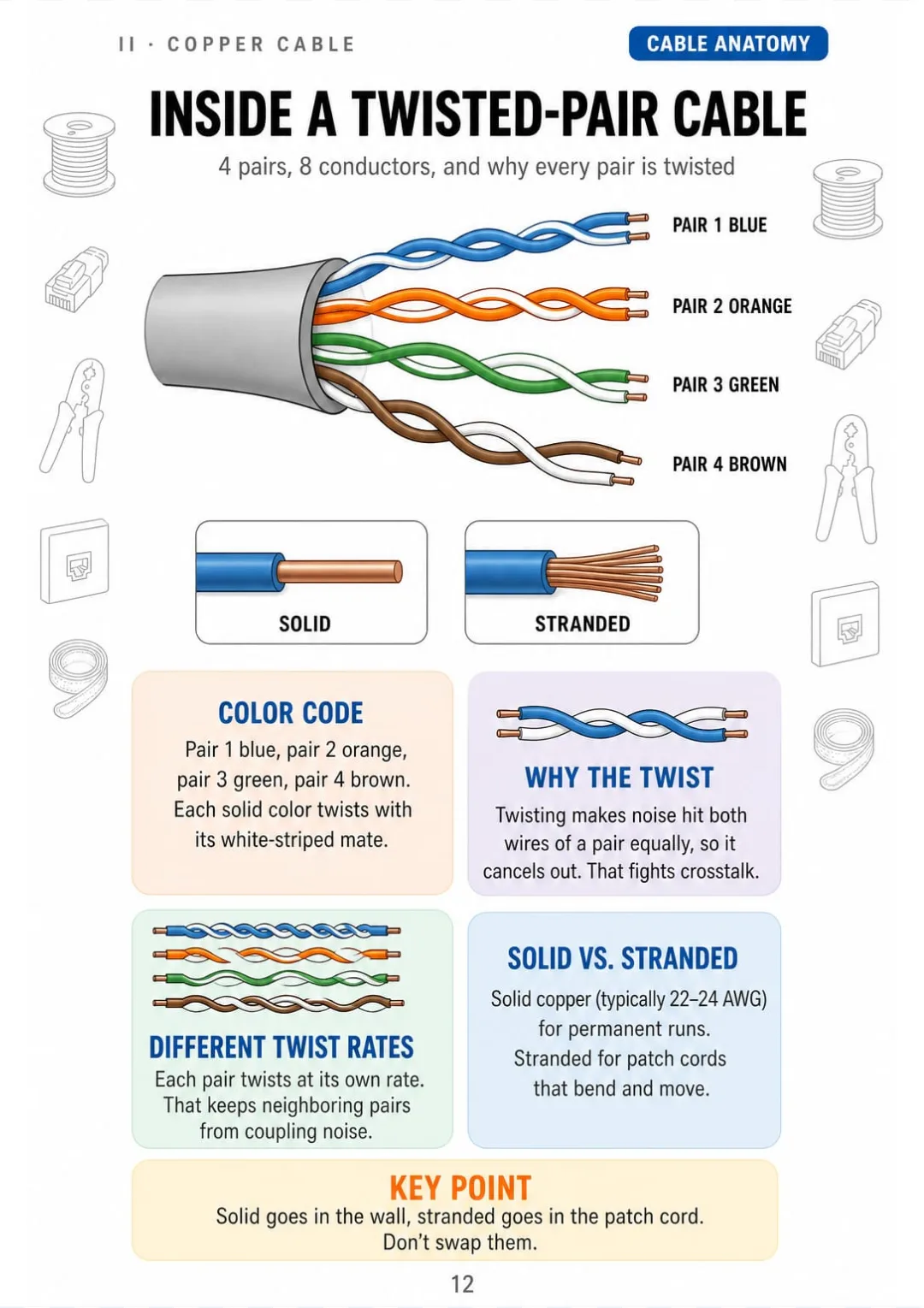
4 pairs: blue, orange, green, brown. Solid in the wall, stranded in patch cords.
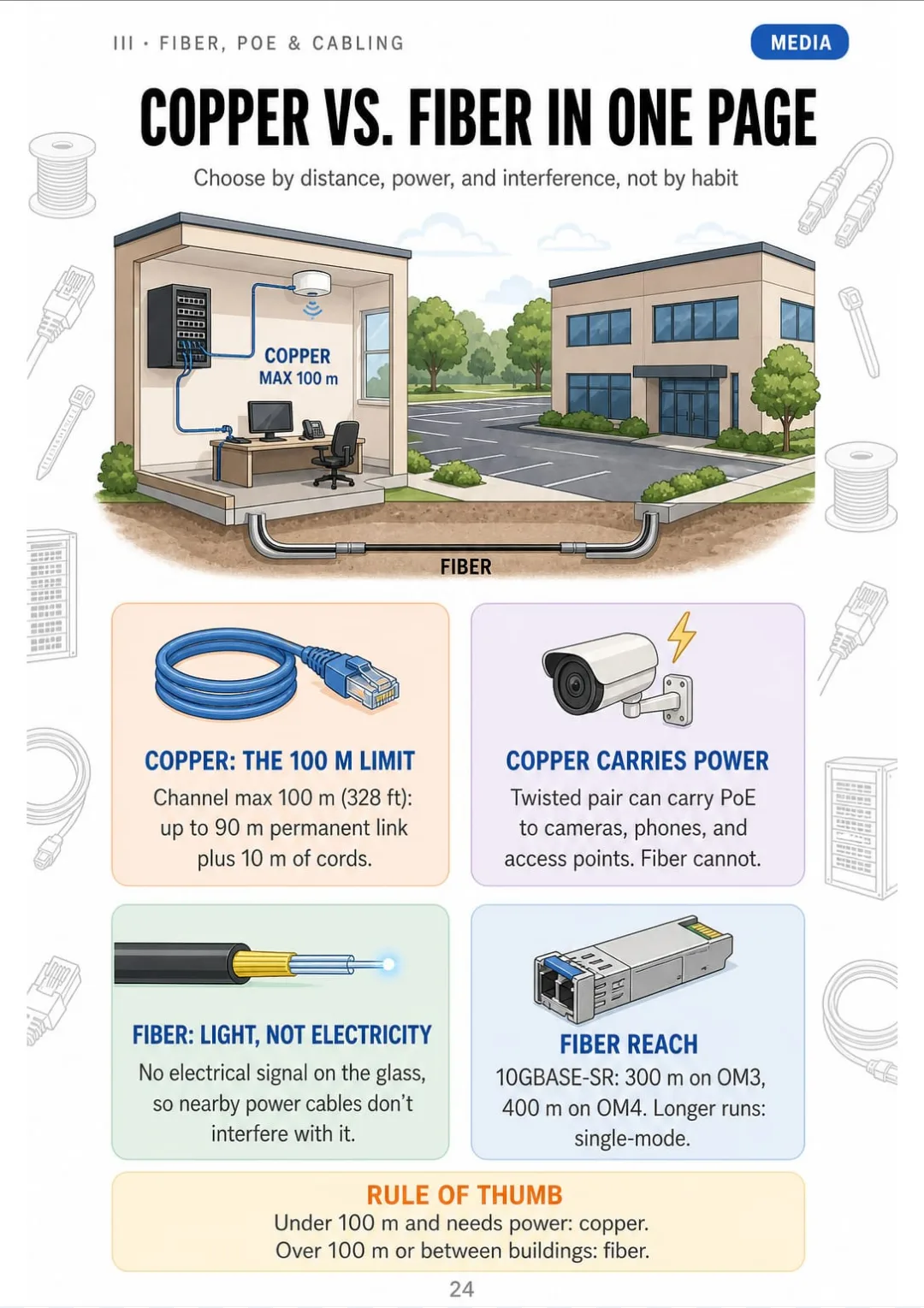
Copper: 100 m channel and PoE. Fiber: 300–400 m on OM3/OM4, more on single-mode.
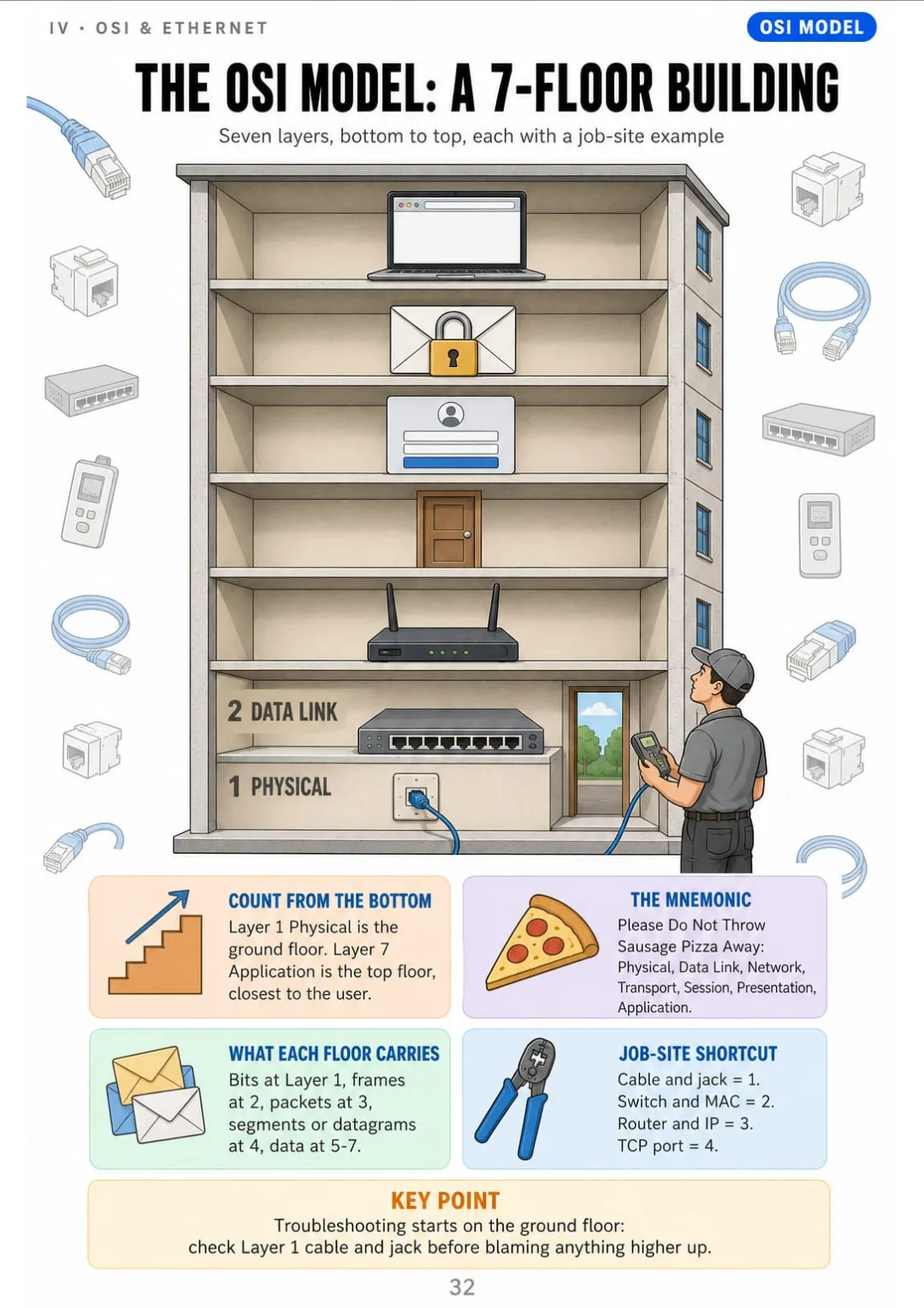
OSI from the bottom up: 1 Physical, 2 Data Link, 3 Network, 4 Transport, 5 Session, 6 Presentation, 7 Application.
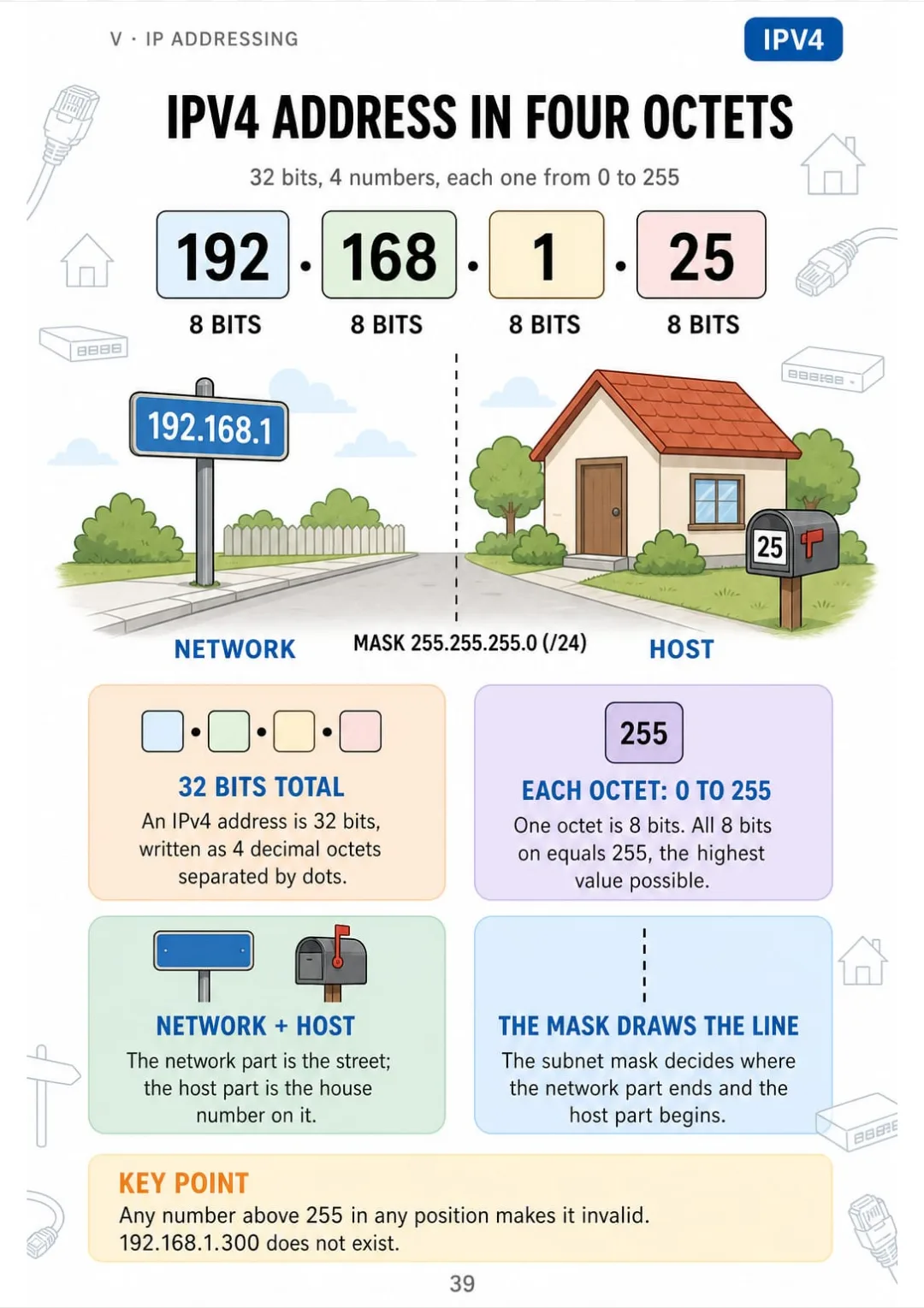
IPv4: 32 bits in 4 octets from 0 to 255, network part plus host part
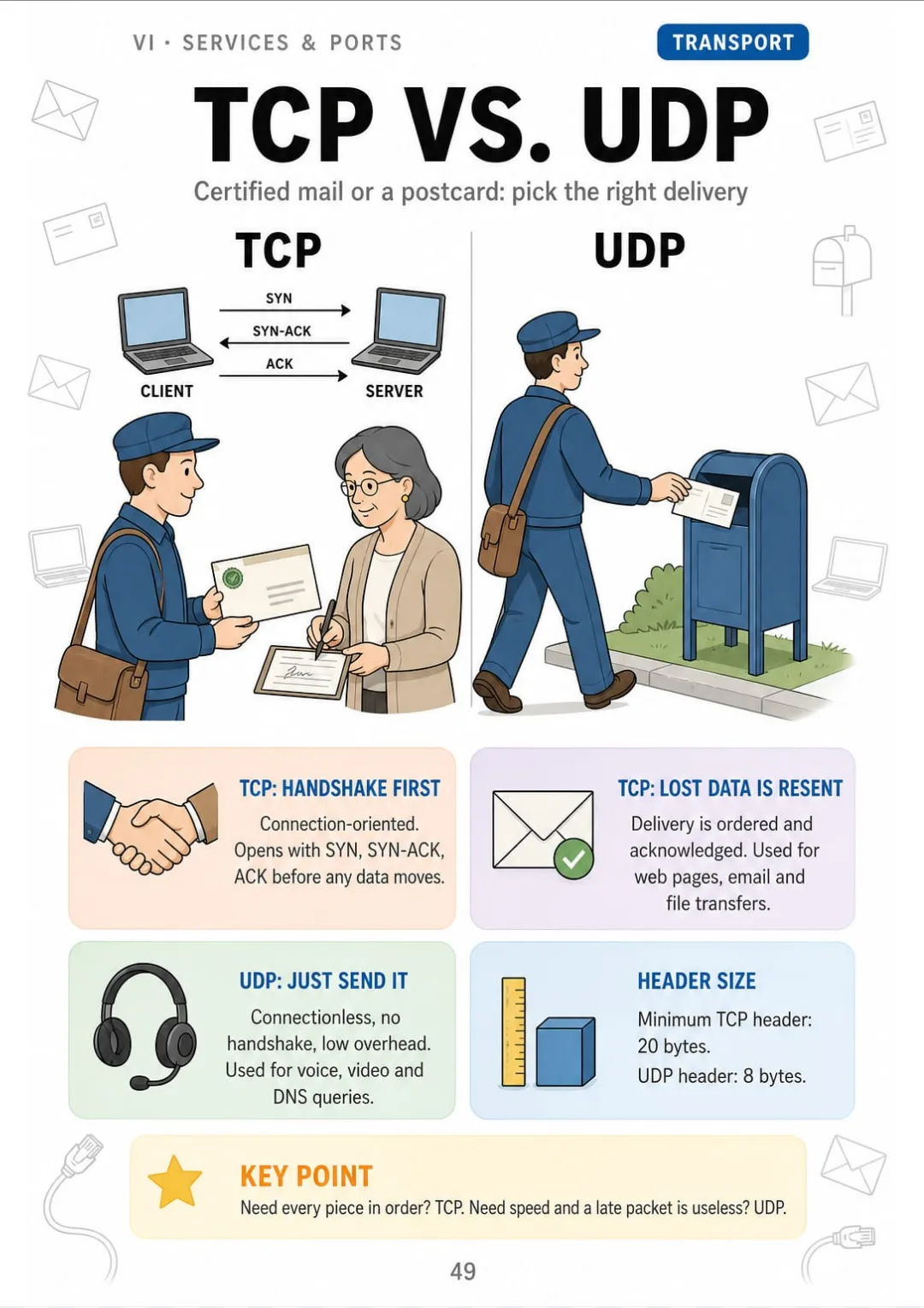
TCP: 3-way handshake, 20-byte header. UDP: no handshake, 8-byte header.
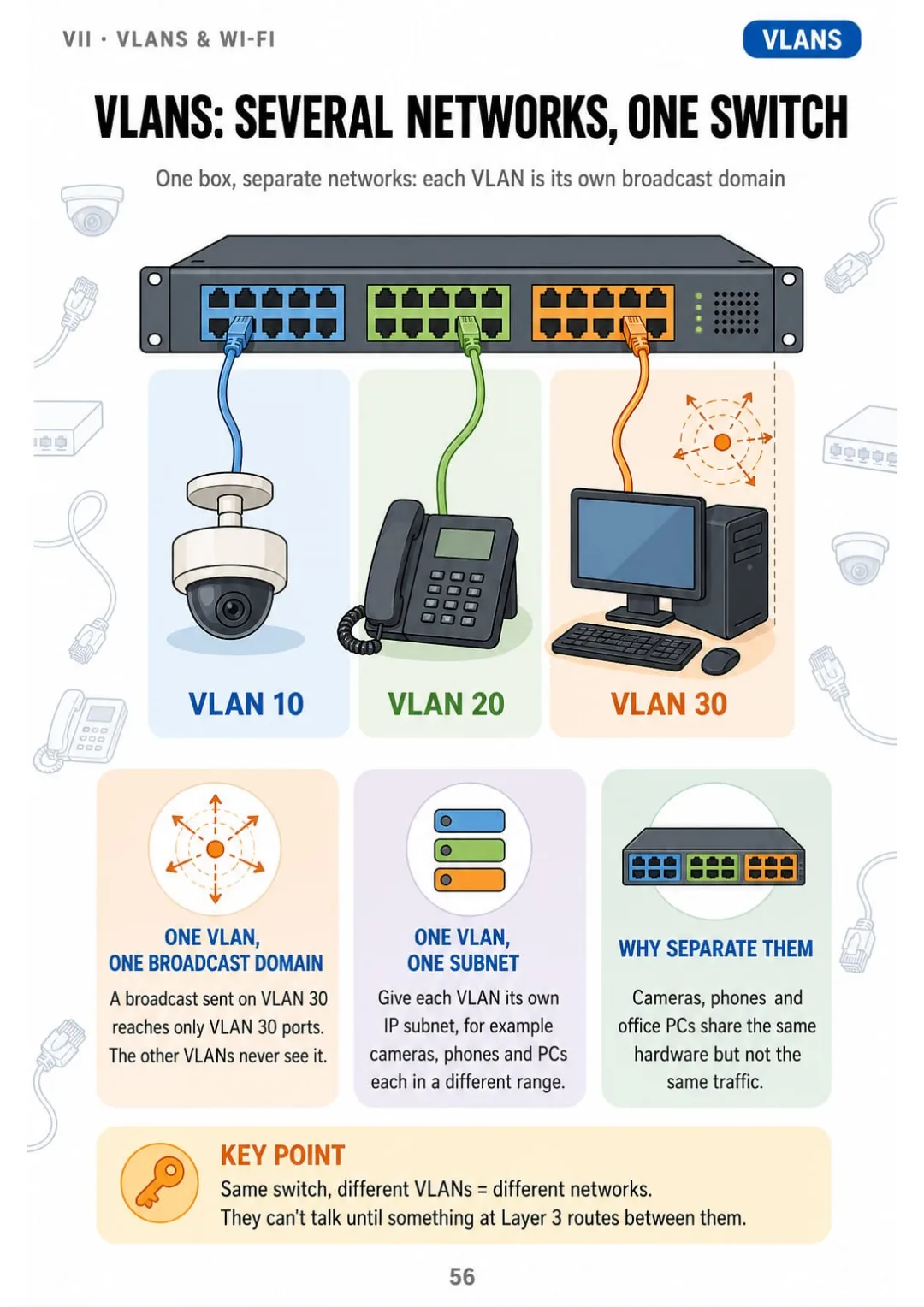
Each VLAN = its own broadcast domain and its own subnet, on the same switch
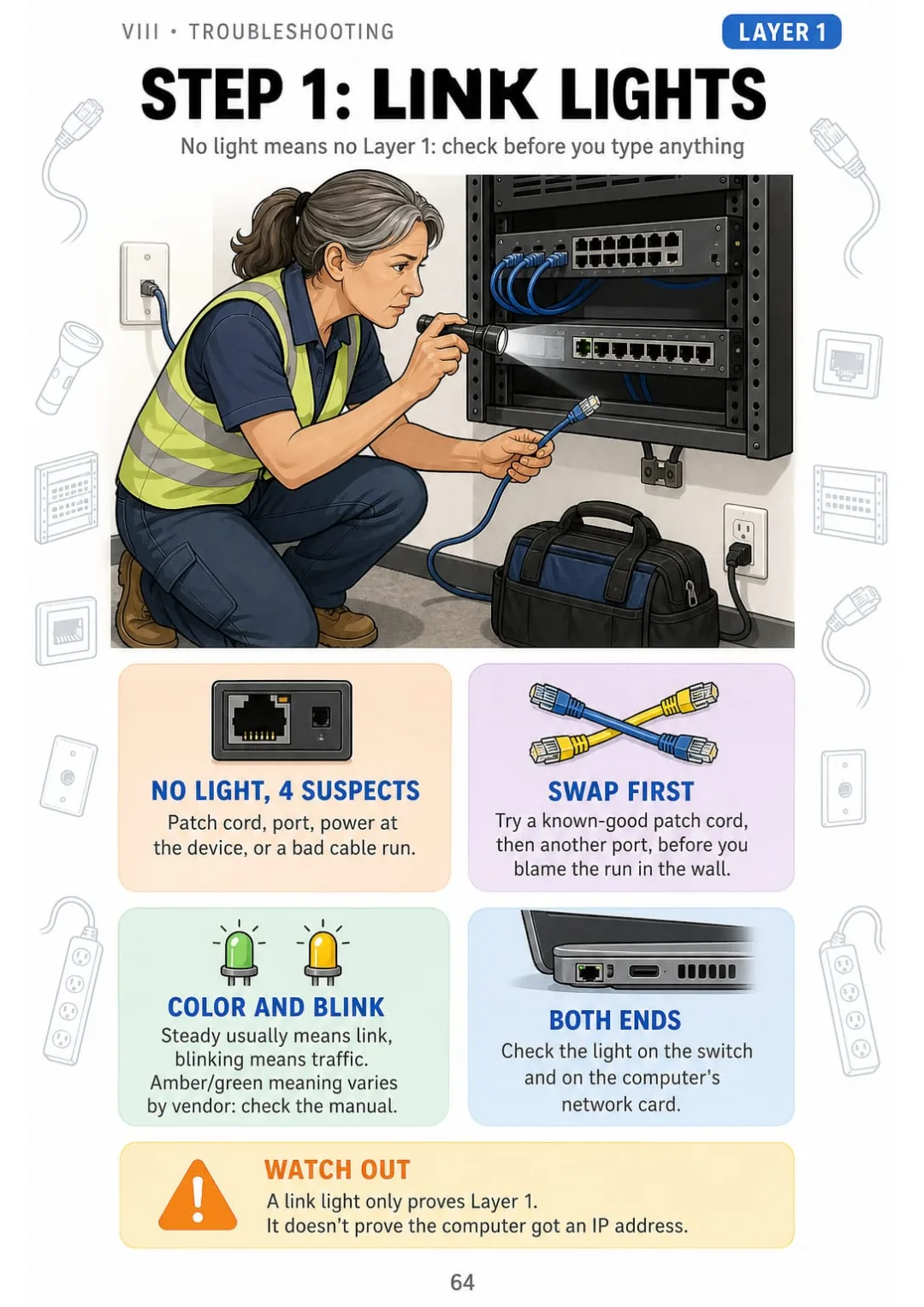
No link light = Layer 1: patch cord, port, power or the run. Swap cord and port first

Swipe to see more →

These are real pages from the book. The table of contents is the full one: 9 parts and 70 topics.

The Problem Isn't You. It's How It Was Explained to You.

You're in a warehouse office. The new camera goes on the far wall, about 450 feet from the closet. The customer asks: copper or fiber? Then he waits for your answer.

You read about this last night, then watched two videos. The manual gave it four paragraphs on attenuation and channel limits. The videos gave you two different numbers. Nobody just told you where copper stops.

Copper: 100 m channel and PoE. Fiber: 300–400 m on OM3/OM4, more on single-mode.

In this book, copper vs. fiber gets one page with two cables side by side: copper, a 100 m (328 ft) channel plus PoE. Fiber, 300–400 m (about 1,000–1,300 ft) on OM3/OM4 at 10 Gb/s, and much more on single-mode. You can see exactly where copper runs out.

The rest of the book works the same way. T568A vs. T568B, PoE by the numbers, the CMP/CMR/CM fire ratings, VLANs and the troubleshooting ladder: each one has its own page.

The next time a customer asks, you answer right there and you know why. No digging through the manual in the truck.

COMPARE FOR YOURSELF

The Same Topic, Two Ways to Study It

THIS
  • The manual: line after line after line
  • Pairs, colors and twists explained only in words
  • You show up to the job or the exam still unsure
Balanced twisted-pair cabling consists of four individually twisted pairs of insulated copper conductors, identified by the color codes blue, orange, green and brown, each paired with a white or white-striped conductor. The twist rate varies from pair to pair in order to reduce near-end crosstalk and susceptibility to electromagnetic interference. Solid-conductor cable is specified for horizontal permanent links installed in walls and ceilings, whereas stranded-conductor cable is generally specified for patch cords and equipment cords, owing to its greater flexibility under repeated flexing.
FOR THIS
  • The twisted-pair cable in one drawing
  • The 4 pair colors in one box
  • You see it and you get it
4 pairs: blue, orange, green, brown. Solid in the wall, stranded in patch cords.
CONTENTS

Take a Look at the 9 Parts and 70 Topics

The network in one picture, copper cable and termination, fiber, PoE and structured cabling, the OSI model and Ethernet, IP addressing and subnetting, services and ports, VLANs and Wi-Fi, troubleshooting from the bottom up, and review checklists: 75 pages, all illustrated

IThe Network in One Picture · pp. 6-11
  1. From the Cable to the IP: The Map of This Book
  2. LAN, WAN, and the Internet
  3. Bits, Bytes, and Speed
  4. Topologies You Will Actually See
  5. Client, Server, and Peer-to-Peer
  6. The Network Closet at a Glance
IICopper Cable and Termination · pp. 12-23
  1. Inside a Twisted-Pair Cable
  2. Cat5e, Cat6, Cat6A: Which One and Why
  3. UTP vs. Shielded Cable
  4. T568B Wire by Wire
  5. T568A vs. T568B: The Only Difference
  6. Straight-Through, Crossover, and Auto-MDI-X
  7. Crimping an RJ45 in 6 Steps
  8. Punching Down a Keystone Jack
  9. Punching Down a Patch Panel
  10. Pulling Rules: Bend, Tension, and Distance
  11. Keeping Data Away From Power
  12. Coax Still on the Job: RG6 and RG59
IIIFiber, PoE, and Structured Cabling · pp. 24-31
  1. Copper vs. Fiber in One Page
  2. Multimode vs. Single-Mode
  3. Fiber Connectors and Transceivers
  4. Fiber Safety and Cleanliness
  5. Power over Ethernet by the Numbers
  6. Fire Ratings: CMP, CMR, CM
  7. The 6 Subsystems of Structured Cabling
  8. Labeling and Documentation
IVThe OSI Model and Ethernet · pp. 32-38
  1. The OSI Model as a 7-Floor Building
  2. OSI vs. TCP/IP Model
  3. Encapsulation: The Envelope Inside the Envelope
  4. MAC Addresses
  5. Hub, Switch, Router: Who Does What
  6. How a Switch Learns: The MAC Table
  7. Loops and Spanning Tree
VIP Addressing and Subnetting · pp. 39-48
  1. IPv4 Address in Four Octets
  2. Binary in 8 Boxes
  3. Subnet Masks and CIDR
  4. Private, Public, and Special Addresses
  5. Default Gateway: The Door Out
  6. Subnetting in 4 Steps
  7. Worked Example: 192.168.10.77/26
  8. How Many Hosts, How Many Subnets
  9. NAT and PAT: Many Devices, One Public IP
  10. IPv6 Without the Panic
VIServices, Ports, and Protocols · pp. 49-55
  1. TCP vs. UDP
  2. DHCP: DORA in 4 Steps
  3. DNS: From Name to Number
  4. ARP: From IP to MAC
  5. Port Numbers Worth Knowing
  6. Secure vs. Insecure Pairs
  7. Firewalls and ACLs in One Picture
VIIVLANs and Wi-Fi · pp. 56-62
  1. VLANs: Several Networks on One Switch
  2. Access vs. Trunk Ports and the 802.1Q Tag
  3. Routing Between VLANs
  4. Wi-Fi Standards by Generation
  5. 2.4 GHz vs. 5 GHz vs. 6 GHz
  6. Placing Access Points
  7. Wi-Fi Security: WPA2, WPA3, and the Guest Network
VIIITroubleshooting From the Bottom Up · pp. 63-70
  1. The Troubleshooting Ladder
  2. Step 1: Link Lights and the Physical Layer
  3. Step 2: Reading the Cable Tester
  4. Miswire: Is It the Plug or the Patch Panel?
  5. Step 3: ipconfig and What It Tells You
  6. Step 4: Ping in the Right Order
  7. Step 5: tracert, nslookup, and Beyond
  8. Common Symptoms and Their Layer
IXReview and Job Checklists · pp. 71-75
  1. The Whole Network on One Page
  2. Checklist: Before You Leave a Cabling Job
  3. Checklist: Bringing a New Device Online
  4. Mixed-Up Pairs: Terms People Confuse
  5. Subnetting Quick Drill

One Page, One Topic, All Clear

Think of it this way:

It's Monday morning on site. The front desk wall jack is dead, and the office manager is standing right behind you.

You open the book to the troubleshooting ladder. Six rungs drawn in order: link lights, cable tester, ipconfig, ping, tracert, nslookup. You start at the bottom rung and work your way up.

IPv4: 32 bits in 4 octets from 0 to 255, network part plus host part

The same goes for the T568B pinout, subnetting in 4 steps, DHCP's DORA, the MAC table and the 802.1Q tag. Each one is on its own page.

Networking & Cabling Illustrated has 9 parts and 70 topics, all drawn. At the end you get job checklists, a page of terms people mix up and a subnetting quick drill.

What you see drawn, you don't have to memorize.

What's Inside Networking & Cabling Illustrated:

Ipp. 6-11

The Network in One Picture

The map of the book from the cable to the IP, LAN vs. WAN, bits and speed, topologies, client and server, and the network closet at a glance.

IIpp. 12-23

Copper Cable and Termination

Inside a twisted-pair cable, Cat5e vs. Cat6 vs. Cat6A, UTP vs. shielded, T568A and T568B wire by wire, crimping, keystones, patch panels, pulling rules and coax.

IIIpp. 24-31

Fiber, PoE, and Structured Cabling

Copper vs. fiber, multimode vs. single-mode, connectors, fiber safety, PoE by the numbers, CMP/CMR/CM fire ratings, the 6 subsystems and labeling.

IVpp. 32-38

The OSI Model and Ethernet

The OSI model as a 7-floor building, OSI vs. TCP/IP, encapsulation, MAC addresses, hub vs. switch vs. router, the MAC table and spanning tree.

Vpp. 39-48

IP Addressing and Subnetting

You stop fearing a /26. IPv4 in four octets, binary in 8 boxes, masks and CIDR, private addresses, the default gateway, and subnetting in the same 4 steps with a worked example, plus NAT and IPv6.

VIpp. 49-55

Services, Ports, and Protocols

TCP vs. UDP, DHCP's DORA, DNS, ARP, the port numbers worth knowing, secure vs. insecure pairs, and firewalls and ACLs.

VIIpp. 56-62

VLANs and Wi-Fi

VLANs on one switch, access vs. trunk ports and the 802.1Q tag, inter-VLAN routing, Wi-Fi generations, 2.4/5/6 GHz, AP placement and WPA2/WPA3.

VIIIpp. 63-70

Troubleshooting From the Bottom Up

When a user says the internet is down, you know where to start. The troubleshooting ladder rung by rung: link lights, the cable tester, miswires, ipconfig, ping, tracert, nslookup and symptoms by layer.

IXpp. 71-75

Review and Job Checklists

The whole network on one page, checklists for cabling jobs and new devices, terms people confuse, and a subnetting quick drill.

At the end of the book: Job checklists, a page of terms people confuse and a subnetting quick drill.
Plus: 2 Free Books

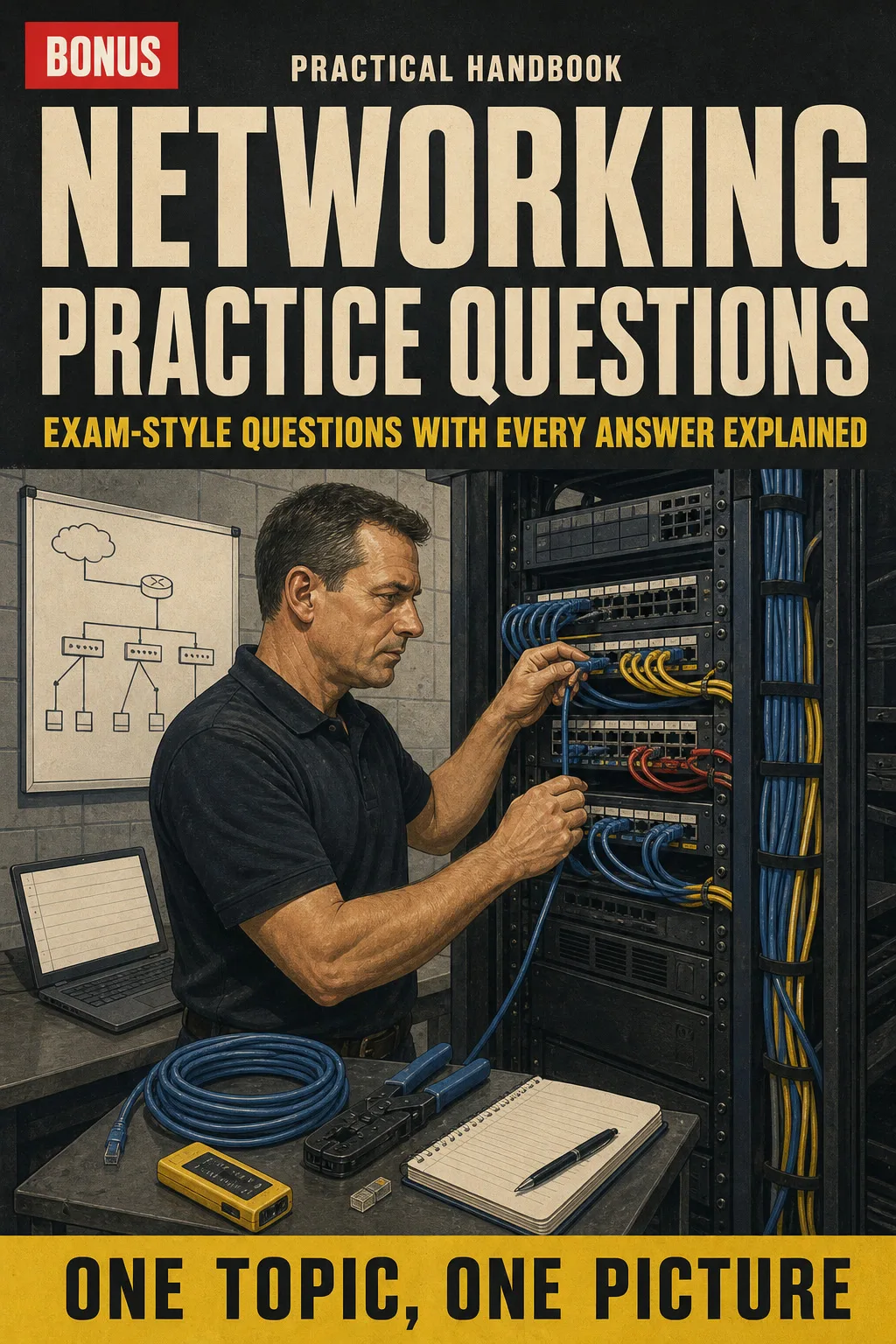
Networking Practice Questions: Exam-Style Questions with Every Answer Explained

BONUS 1: «Networking Practice Questions: Exam-Style Questions with Every Answer Explained»

Value on its own: US$ 17.90

Test yourself topic by topic, from pinouts to subnetting, and see exactly why each answer is right or wrong.

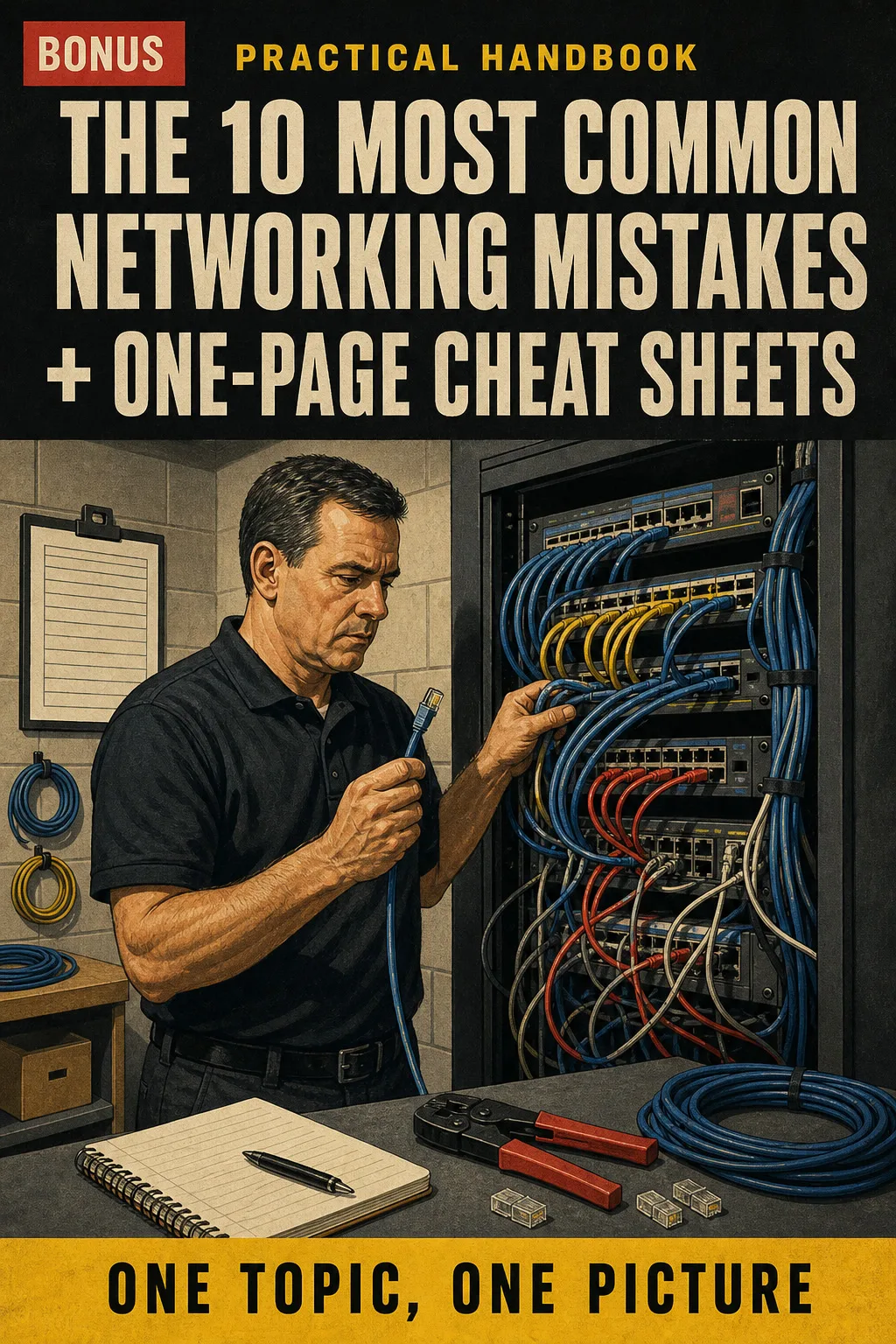
The 10 Most Common Networking Mistakes + One-Page Cheat Sheets

BONUS 2: «The 10 Most Common Networking Mistakes + One-Page Cheat Sheets»

Value on its own: US$ 14.90

See each common mistake next to the correct way, drawn before and after, plus printable one-page charts for pinouts, ports and subnet masks to keep in your toolbag.

Networking & Cabling Illustrated with 2 Free Books

  • Networking & Cabling Illustrated: 75 illustrated pagesUS$ 63
  • BONUS 1: Networking Practice Questions: Exam-Style Questions with Every Answer ExplainedUS$ 17.90
  • BONUS 2: The 10 Most Common Networking Mistakes + One-Page Cheat SheetsUS$ 14.90
  • High-resolution PDF to printIncluded
Total value US$ 95.80
YOUR PRICE:
US$ 27
You save US$ 68.80
YES, I WANT NETWORKING & CABLING ILLUSTRATED FOR US$ 27

📄 This is a digital PDF book sent to your email: nothing is printed or shipped.

Secure purchaseEncrypted payment30-day guarantee

PDF by email: We email you Networking & Cabling Illustrated as a PDF, together with the two free books. It's a single payment: no installments, no extra charges.

Who This Book Is For

You're switching careers into networking

You're switching careers into networking

You learn the network from the cable up, one page at a time and always in the same order, so the pieces finally fit together.

Your certification exam is coming up

Your certification exam is coming up

You review the topics entry-level networking certifications cover, from pinouts to subnetting, and test yourself with the practice questions in the bonus book.

You already pull cable or work help desk

You already pull cable or work help desk

You keep it on hand, printed or on your phone, for the moment a tester says miswire or a user says the internet is down.

Everything You Get Today

US$ 95.80US$ 27
YES, I WANT NETWORKING & CABLING ILLUSTRATED FOR US$ 27

📄 This is a digital PDF book sent to your email: nothing is printed or shipped.

30DAYS
GUARANTEE

30-Day Guarantee

Try Networking & Cabling Illustrated for 30 days, bonus books included.

We refund everything if the file won't open, if the book isn't what you see here, if you were charged twice or if the email doesn't arrive. Just email us.

You pay once. No subscriptions.

Frequently Asked Questions

Is this for me if I already pull cable but never learned the networking side?

Yes. It starts at the cable you already know and works up to IP addresses, subnetting, VLANs and troubleshooting, one topic per page.

Where does the content come from?

It's checked against ANSI/TIA-568, TIA-569 and TIA-606 for cabling, IEEE 802.3, 802.1Q and 802.11 for Ethernet, VLANs and Wi-Fi, and the NEC (NFPA 70) for cable fire ratings.

Is this official material?

No. It covers the topics entry-level networking certifications ask about: cabling and pinouts, the OSI model, IP addressing and subnetting, ports and protocols, VLANs, Wi-Fi and troubleshooting. It isn't affiliated with any certification body or standards organization, and it doesn't come with a certificate: that comes from passing the exam itself.

Does it replace a course or hands-on training?

No. It's an illustrated study and review book. Use it alongside your course, your training and the codes that apply to your job.

Are the practice questions the real exam questions?

No. They're exam-style questions written for this book, and every answer comes with an explanation.

When and how do I get it?

The book and the 2 bonus books come as PDFs by email, sent to the address you enter at checkout.

Do I have to pay every month?

No. You pay once.

Can I have it on paper?

Yes. It's a PDF you can print at home or at a print shop and take to the job site.

How does the refund work?

You have 30 days. We refund everything if the file won't open, if the book isn't what you see on this page, if you were charged twice or if the email doesn't arrive: just email us.

Before You Close This Page

No more rereading without anything sticking.

Pinouts, subnets and the troubleshooting ladder: you see them drawn and you've got them.

You show up to the job or the exam knowing where everything is.

Drawings make studying faster.

The book is right below.

One-time payment: US$ 27 · Guarantee: 30 days · PDF by email

YES, I WANT NETWORKING & CABLING ILLUSTRATED FOR US$ 27

📄 This is a digital PDF book sent to your email: nothing is printed or shipped.